AMAZON

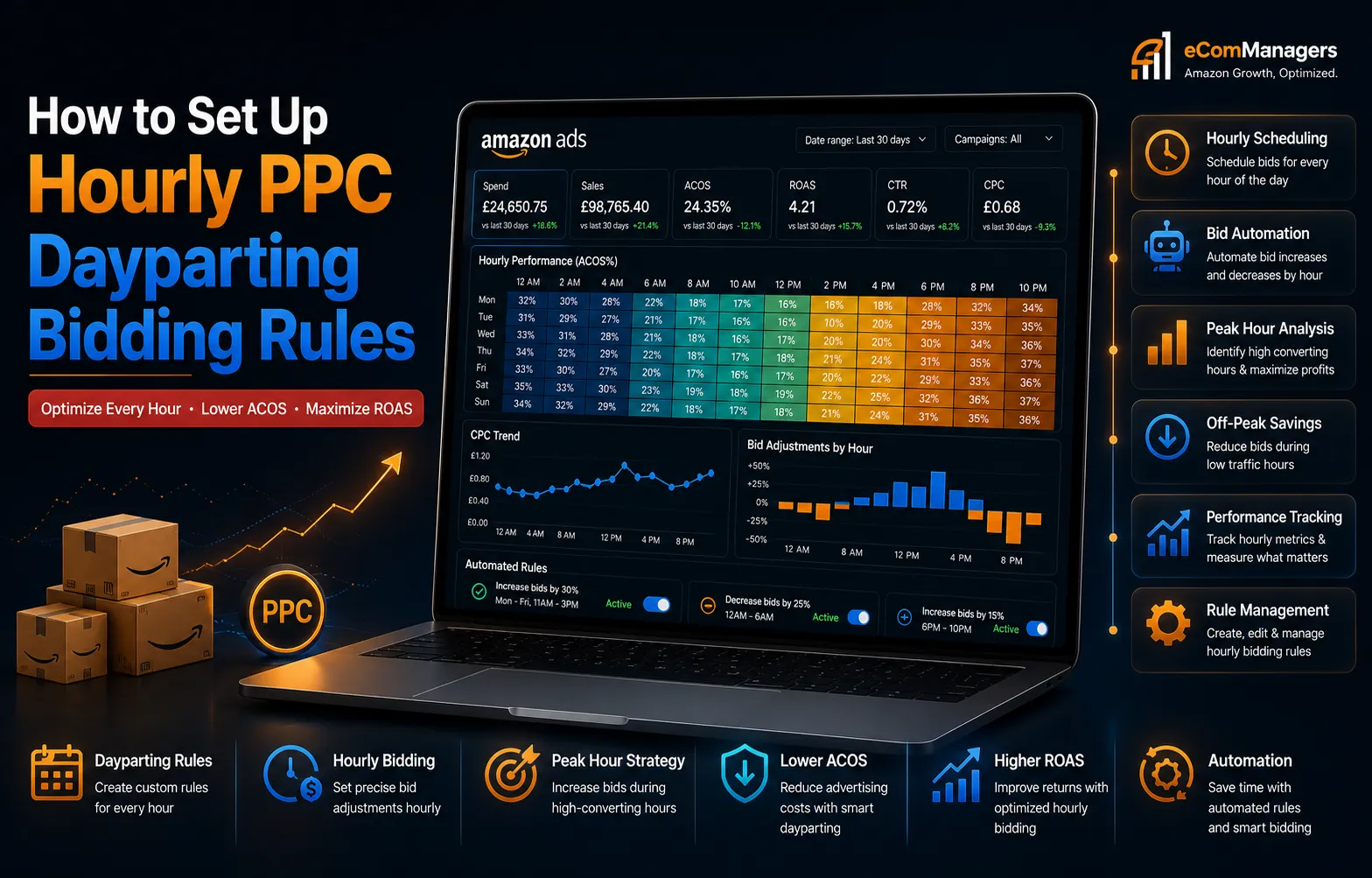
How to Set Up Hourly PPC Dayparting Bidding Rules

Introduction

Amazon advertising has evolved into a hyper-competitive space where standard daily budgets are no longer enough to guarantee profitability. If you keep your campaigns running on a flat bid 24/7, you are burning valuable capital during hours when conversion rates drop. Smart brands use advanced automation to adjust to shifting consumer habits.

By utilizing precise scheduling, you can maximize your visibility when buyers are active and cut spend when they are sleeping. Implementing hourly controls is the most reliable way to boost your advertising returns. This comprehensive guide will show you exactly how to execute this strategy to dominate your niche.

Why Hourly Bidding Rules Matter Most

Because this topic has been poorly covered for years, a few specific myths have taken root in the seller community. Here is what is not true:

Traffic Fluctuates Drastically Throughout the Day

Consumer shopping behavior on Amazon changes significantly depending on the clock. Early morning hours often bring high clicks but low purchase intent, as users browse while commuting. Conversely, late evening hours generally witness a massive surge in actual conversion rates. Without hourly adjustments, your daily budget might completely run out by noon on low-converting window shoppers.

Flat Bidding Strategies Drain Your Ad Budget Fast

When you apply a single bid across a full 24-hour cycle, you pay the same price per click at 3:00 AM as you do at 8:00 PM. This architectural flaw forces you to overpay during dead hours or under-bid during peak shopping rushes. Transitioning to dynamic hourly adjustments ensures every dollar targets high-intent traffic.

True Profitability Requires Precision Dayparting

Modern e-commerce margins are tighter than ever before. To protect your bottom line, your advertising campaigns must align perfectly with real-time consumer conversion patterns. Implementing rule-based hourly scheduling ensures your products stay visible exactly when your target audience is ready to press the buy button.

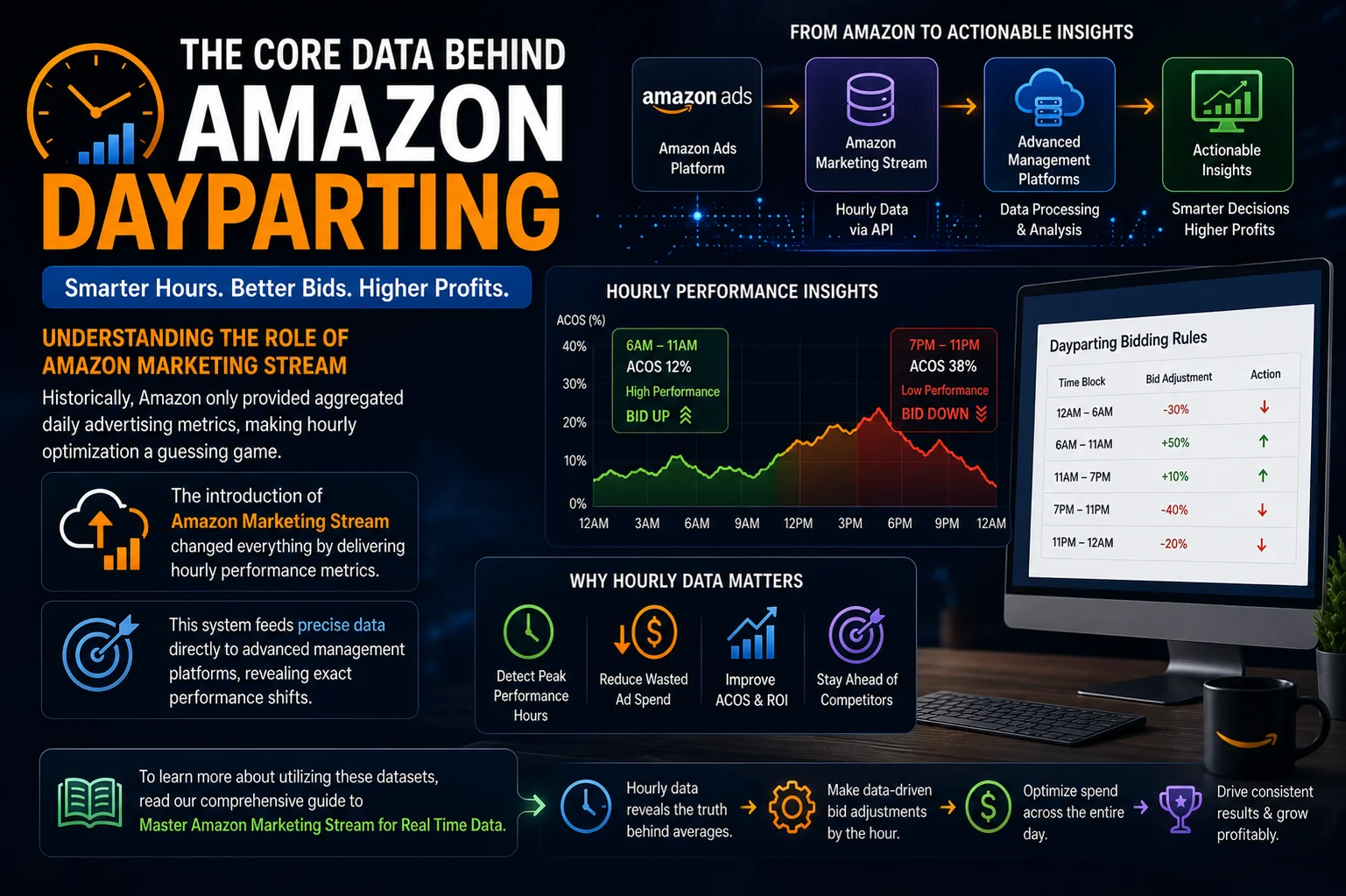
The Core Data Behind Amazon Dayparting

Understanding the Role of Amazon Marketing Stream

Historically, Amazon only provided aggregated daily advertising metrics, making hourly optimization a guessing game. The introduction of Amazon Marketing Stream changed everything by delivering hourly performance metrics. This system feeds precise data directly to advanced management platforms, revealing exact performance shifts. To learn more about utilizing these datasets, read our comprehensive guide to Master Amazon Marketing Stream for Real Time Data.

Real-Time Stream API Data Delivery

The Stream API sends metrics within minutes of the actual click event. This level of immediacy eliminates the traditional 48-hour data lag, allowing software to execute bidding rules instantly.

Understanding Hourly Data Compression Models

Data compression ensures that massive bursts of hourly information do not overwhelm your database infrastructure. It filters out non-essential data points while preserving critical conversion metrics.

Managing Multi-Region Server Data Syncs

When operating across multiple international marketplaces, server synchronization ensures your hourly charts adjust correctly for regional daylight savings adjustments.

Analyzing Key Metrics Across 24 Hour Windows

To build a successful scheduling strategy, you must isolate your hourly Advertising Cost of Sales (ACoS), Total Advertising Cost of Sales (TACoS), and Conversion Rate (CVR). Look for consistent weekly trends rather than daily anomalies. If you want to understand how these metrics impact your wider growth, check out our Amazon Advertising Metrics Guide: ACoS vs TACoS Explained.

Spotting Hidden Buying Trends in Your Category

Every product category displays unique hourly footprints. For example, business supplies peak during office hours, while household items see a massive lift in the evening. Identifying these distinct behaviors allows you to align your capital with actual purchasing velocity.

Step 1: Export Hourly Performance Data

Navigating to the Amazon Advertising Console

Log into your seller central account and navigate directly to your advertising analytics console. From there, access the reporting center to configure a customized report that breaks down performance on a granular level. Ensure your data window covers a minimum of 30 to 60 consecutive days for accuracy.

Setting Up the Stream Report Parameters Correctly

When generating your report, select the intraday distribution option powered by the marketing stream protocol. Filter your view by campaign type, focusing primarily on your highest-spending asset groups. Export this structural diagnostic profile into a clean spreadsheet format for deeper numerical calculation.

Identifying Peak Performance and Dead Zones Fast

Open your data sheet and organize the rows by hour blocks. Highlight the hours that generate the highest conversion rates alongside the lowest cost per acquisition. Conversely, mark the dark hours where your spend continues to accumulate without generating any meaningful sales volume.

Step 2: Calculate Custom Bidding Shifts

Finding the Mathematical Baseline for Your Bids

Your baseline bid represents the standard amount required to achieve stable visibility during average traffic conditions. Calculate this number by evaluating your historical cost-per-click across standard operations. Once established, this baseline serves as the foundation for all subsequent upward or downward hourly adjustments.

Formulas for Peak Hour Performance Adjustments

During your identified high-conversion windows, you want to aggressively capture top-of-search placements. Increase your bids using a calculated percentage multiplier based on historical performance shifts. For example, if conversions double between 7:00 PM and 10:00 PM, increase your bids by 25% to 40% to outpace competitors.

Formulas for Low Traffic Budget Conservations

When your target audience goes offline, you must immediately transition into capital preservation mode. Reduce your baseline bids by 30% to 50% during these documented dead zones to prevent toxic spend. This defensive adjustment preserves your daily budget, leaving plenty of runway for the next day’s profitable traffic waves.

Step 3: Configure Automation Rules Inside

Building Your Core Scheduling Rules Framework

Manual changes are completely impractical for 24-hour operations. Instead, log into your advanced campaign management dashboard to construct rule-based scheduling workflows. Create distinct trigger sequences for morning, afternoon, and night blocks to automate your calculated bidding shifts seamlessly.

Setting Up Custom Automation Multipliers Safely

Apply your calculated percentage modifiers directly within your rule engine. Ensure you establish strict boundary constraints, such as minimum and maximum bid ceilings, to protect your accounts from sudden market volatility. For elite scaling, discover how an expert team handles these systems in our guide on the Best Amazon PPC Agency Services for Profitable Growth.

Connecting Your Campaigns to the Active Rule Engine

Assign your newly constructed hourly rules directly to your active campaigns, prioritizing high-spend variations. Double-check that your rule time zone matches the specific marketplace marketplace settings to avoid scheduling misalignment. At eComManagers, we always implement these guardrails to ensure flawless automated execution.

Step 4: Monitor and Optimize the Rules

Tracking Early Performance Gains and Metric Shifts

Let your newly deployed automated rules run uninterrupted for at least 14 consecutive days. Monitor your total ad spend distribution to verify that capital is shifting into high-intent hours. Look for an immediate stabilization of your daily budgets and a steady reduction in toxic click volumes.

Rebalancing Your Hourly Rules for Seasonality

Consumer shopping timelines naturally shift during major holiday periods or seasonal events. Review your hourly tracking reports monthly to account for these broader structural market movements. Regular adjustments ensure your scheduling engine remains highly optimized throughout the entire calendar year.

Scaling Profitability Across Your Whole Portfolio

Once your initial dayparting rules deliver stable, profitable returns, scale the exact framework across your broader catalog. Group similar products together to apply unified scheduling adjustments efficiently. For a deeper look at comprehensive scaling systems, check out The Complete Guide to Amazon PPC Management: Strategy, Optimization & Scaling in 2026.

Common Dayparting Mistakes to Avoid

Making Drastic Bid Changes on Incomplete Data

One of the most dangerous mistakes a brand can make is modifying bidding engines based on shallow data pools. A single high-volume day can easily distort your hourly averages if your analysis window is too narrow. Always base your optimizations on long-term, verifiable trends.

Forgetting Marketplace Time Zone Synchronization

Amazon accounts operate strictly on the local time of the specific marketplace they serve. If your management team works in a different region, a failure to adjust for time zone differences will ruin your strategy. This oversight causes bids to skyrocket during dead hours and drop during peak shopping windows.

Neglecting Regular System Audits and Adjustments

Automated bidding rules are not a hands-off, permanent solution. Competitor tactics, new product entries, and shifts in Amazon’s algorithms can alter your conversion windows over time. If you want to verify your current system setup, read about our Amazon PPC Audit Service: What It Costs, What You Get, and Why It Matters in 2026.

Real Success: Dayparting Case Studies

How We Reduced ACoS and Doubled Total Revenue

A growing brand struggled with massive budget exhaustion midway through the afternoon, leaving them completely invisible during prime evening shopping hours. Our specialized team stepped in to analyze their data streams and implement a rigorous dayparting strategy. See the exact breakdown of how we achieved this by reviewing our case study: Case Study: How an Amazon Seller Reduced ACoS by 50% in Just 3 Months.

Restructuring Ad Accounts for Explosive ROAS Growth

Misaligned bidding frameworks across legacy campaigns frequently result in severely stunted brand growth. By deploying advanced hourly multipliers, we successfully reclaimed lost market share while dramatically lowering total ad waste. To see our structural approach in action, explore our Triple8 ROAS Growth PPC Restructuring Case Study.

Turning Wasteful Clicks into Profitable Conversions

Unoptimized keywords often drain capital during off-peak hours when conversion intent is low. Our technical dayparting intervention reallocated that wasted budget directly into high-converting evening traffic windows. Read the full step-by-step account transformation process here: Amazon PPC Case Studies: How We Doubled Seller Revenue in 100 Days.

Let eComManagers Scale Your Campaigns

Comprehensive Store Management Built for Growth

Navigating the complexities of advanced advertising requires continuous monitoring and deep platform expertise. True e-commerce success combines advanced marketing with flawless inventory management and deep account protection. To see how we protect and grow your brand holistically, visit our dedicated Amazon Account Management Services pillar page.

Strategic Partnering for Long Term Sales Success

Partnering with certified professionals gives your brand a massive competitive edge in tough online marketplaces. Our data-driven strategies are engineered to scale sales while consistently protecting your margins. Discover how our full-service approach can transform your operational performance by viewing our main Amazon Services page.

Contact Our Advanced PPC Experts Today

Stop letting unoptimized bidding rules drain your margins and stall your brand’s growth. Let our experienced advertising team build, deploy, and monitor custom hourly automation rules tailored specifically to your catalog. Reach out to eComManagers today to book your expert consultation and unlock true marketplace profitability.

Scroll to Top